Chrome + Firefox = Chromifox?
"A zebra does not change its spots." - Al Gore
The hardest thing about switching from Windows to Linux has been the browser. Firefox is nice, and has some nice features, but I had gotten so used to Chrome...and it's minimalism! I loved having so much viewing space, that wasn't being taken up by buttons and menus I never use. I tried to get Chrome, but:
-Supposedly, one day, Chrome will be available for Linux...but not yet.
-The ported version of Chrome doesn't work all that smoothly.
-Though you can get Chromium still has too many bugs.
None of this changes the fact that I want more screen space. So I had to figure it out myself, and along the way tweaked a few things to take advantage of what Firefox has to offer. Here is what I did in Ubuntu 9.04 (Jaunty):
1. Upgrade to Firefox 3.5 (codename Shiretoko)
a.Open System/Administration/Synaptic Package Manager
b.Search for Firefox 3.5
c.Click the check box to Mark for Installation
d.Accept all dependencies
e.Open Applications/Internet/Shiretoko Web Browser
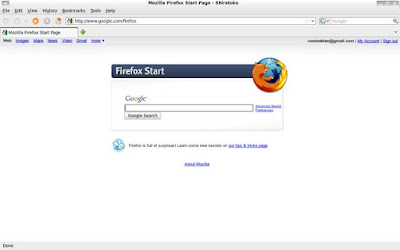
2. Install the Chromifox Extreme theme.
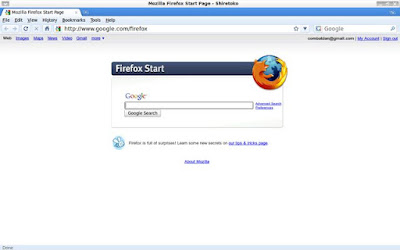
3. Install Add-ons:
a.Hide Menubar - press Alt to show the Menu.
b.Google Toolbar - gives the Chrome New Tab page as well.
c.Auto Hide Status Bar
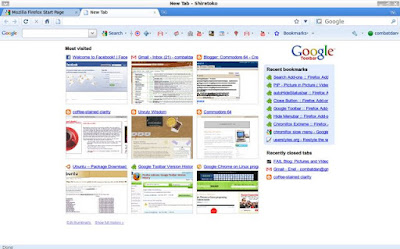
4. Basic Tweaks
a.Move Search Bar
i.right click next to Address Bar
ii.click Customize
iii.simply drag the search bar elsewhere (i.e. the Bookmarks Bar)
iv.click Done
b.Hide Google Toolbar & Bookmarks Toolbar
i.right click next to Address Bar\
ii.uncheck Google Toolbar & Bookmarks Toolbar
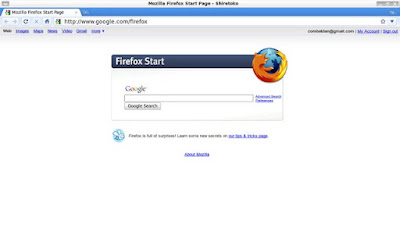
So there you have it! Looks and behaves nearly identically to Chrome!
The hardest thing about switching from Windows to Linux has been the browser. Firefox is nice, and has some nice features, but I had gotten so used to Chrome...and it's minimalism! I loved having so much viewing space, that wasn't being taken up by buttons and menus I never use. I tried to get Chrome, but:
-Supposedly, one day, Chrome will be available for Linux...but not yet.
-The ported version of Chrome doesn't work all that smoothly.
-Though you can get Chromium still has too many bugs.
None of this changes the fact that I want more screen space. So I had to figure it out myself, and along the way tweaked a few things to take advantage of what Firefox has to offer. Here is what I did in Ubuntu 9.04 (Jaunty):
1. Upgrade to Firefox 3.5 (codename Shiretoko)
a.Open System/Administration/Synaptic Package Manager
b.Search for Firefox 3.5
c.Click the check box to Mark for Installation
d.Accept all dependencies
e.Open Applications/Internet/Shiretoko Web Browser
2. Install the Chromifox Extreme theme.
3. Install Add-ons:
a.Hide Menubar - press Alt to show the Menu.
b.Google Toolbar - gives the Chrome New Tab page as well.
c.Auto Hide Status Bar
4. Basic Tweaks
a.Move Search Bar
i.right click next to Address Bar
ii.click Customize
iii.simply drag the search bar elsewhere (i.e. the Bookmarks Bar)
iv.click Done
b.Hide Google Toolbar & Bookmarks Toolbar
i.right click next to Address Bar\
ii.uncheck Google Toolbar & Bookmarks Toolbar
So there you have it! Looks and behaves nearly identically to Chrome!
posted by dan at 11:23
0 comments

![The installer encountered an error copying files to the hard disk:<br /><br />[Errno 5] Input/output error<br /><br />This particular error is often due to a faulty CD/DVD disk or drive, or a faulty hard disk. It may help to clean the CD/DVD, to burn the CD/DVD at a lower speed, to clean the CD/DVD drive lens (cleaning kits are often available from electronics suppliers), to check whether the hard disk is old and in need of replacement, or to move the system to a cooler environment.](http://img174.imageshack.us/img174/5166/errorkf6.png)